The Proflow ecosystem just expanded. ⚡️ Bring operational discipline directly into your local editor with Tyne for VS Code. [ See How It Works ]

Proflow Now Supports Epics, Stories, Tasks, and Bugs for Better Project Delivery
Proflow now helps teams manage epics, stories, tasks, and bugs in one connected workflow. Learn how structured work management improves product planning, engineering delivery, and team visibility.
Dipanjan
5/21/202610 min read
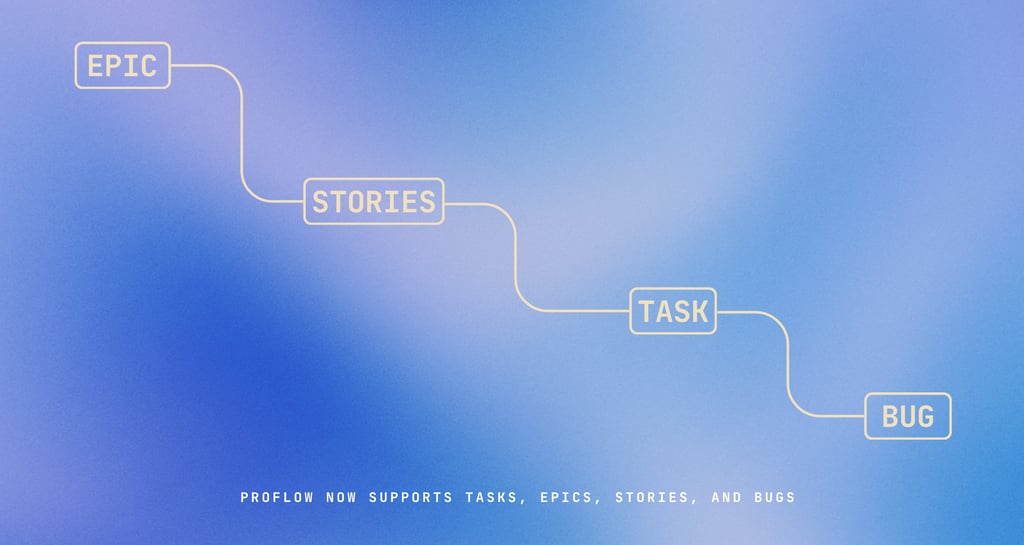
Modern project delivery is no longer about creating a simple task list. Teams today manage product ideas, client requirements, engineering work, bugs, sprint planning, approvals, and delivery timelines at the same time. When all of this work is handled without structure, projects quickly become difficult to track.
This is one of the most common problems in growing teams. Work starts with a clear goal, but soon it gets scattered across meetings, spreadsheets, chat messages, emails, and disconnected task boards. A product manager may track the roadmap in one place, engineers may follow another task list, and bugs may be reported casually in chat. By the time someone asks for the real project status, the team has to manually collect updates from different places.
Proflow is built to reduce that confusion. With the latest update, Proflow now supports Epics, Stories, Tasks, and Bugs, giving teams a more structured way to plan, execute, track, and deliver work from one connected workspace.
This update is an important step toward making Proflow more than a basic task management tool. It helps teams connect high-level planning with real execution, so every work item has context, ownership, priority, and delivery visibility.
Why Structured Work Management Matters
Many teams start with a simple task board because it feels easy. In the beginning, everything looks manageable. A few tasks are created, team members are assigned, and progress starts moving.
But as the project grows, the task list becomes overloaded. A major product feature, a small design change, a backend issue, a client request, and a production bug may all appear in the same list. There is no clear difference between strategic work and execution work. There is no easy way to understand which task belongs to which feature, which bug is blocking delivery, or which user requirement is still pending.
This is where structured work management becomes necessary.
With Epics, Stories, Tasks, and Bugs, Proflow gives every type of work its correct place. Teams can see the big goal, the user requirement, the actual execution work, and the issues that need to be fixed.
Main problems Proflow helps solve:
Scattered work across multiple tools
Teams often manage tasks, bugs, requirements, and approvals in different places. This creates confusion and slows down delivery.No clear connection between planning and execution
A team may know what needs to be built, but not how individual tasks connect to the bigger product goal.Lost bugs and unresolved issues
Bugs reported in chat or meetings are easy to forget. Without a proper bug-tracking workflow, product quality suffers.Poor delivery visibility
Managers and founders often struggle to understand what is done, what is delayed, and what is blocking the team.Unclear ownership
When work is not structured properly, it becomes difficult to know who owns a task, story, bug, or delivery milestone.
What Is an Epic in Proflow?
An Epic represents a large goal, major feature, or product initiative. It is the bigger container that helps the team understand what they are trying to deliver.
For example, if a team is building a finance module, the Epic could be called Finance Dashboard. If the team is working on a client-facing system, the Epic could be Client Portal. If the team is improving internal delivery, the Epic could be Engineering Delivery Board.
The purpose of an Epic is to organize large work into a clear objective. Instead of creating many disconnected tasks, teams can group related work under one larger delivery goal.
Examples of Epics:
Client Portal
A complete area where clients can view project updates, files, invoices, and approvals.Finance Dashboard
A module to track invoices, payments, receivables, and cash flow.Google Calendar Integration
A feature to sync internal events, meetings, and schedules with Google Calendar.Sales CRM Module
A workspace to manage leads, opportunities, clients, and sales pipelines.Engineering Delivery Board
A structured board to manage sprints, tasks, bugs, and development progress.
An Epic answers one important question: What major outcome are we trying to deliver?
What Is a Story in Proflow?
A Story represents a user requirement. It explains what the user needs and why that requirement matters.
For example, under a Finance Dashboard Epic, a Story could be:
“As a business owner, I want to see all pending invoices in one place so that I can follow up on payments faster.”
This is different from a normal task because it focuses on user value. A Story helps the team understand the reason behind the work before execution begins.
Stories are useful for product teams, software teams, agencies, and service businesses because they convert business needs into clear delivery items. Instead of directly saying “build invoice card,” the team first understands why the invoice card is needed and what problem it solves.
A good Story usually includes:
The user
Who needs this feature or improvement?The requirement
What does the user want to do?The value
Why does this matter?The acceptance condition
How will the team know the story is complete?
Example Story format:
“As a project manager, I want to create a sprint so that I can plan engineering work for the week.”
A Story answers the question: What does the user need from this feature?
What Is a Task in Proflow?
A Task is the actual execution work. It is the specific action that needs to be completed by a team member.
For example, under an invoice-related Story, the team may create tasks for designing the invoice card, building the frontend component, creating the API, connecting the database, testing the workflow, and reviewing the final UI.
Tasks are where daily execution happens. They can be assigned to team members, moved across statuses, added to sprints, and tracked until completion.
Examples of Tasks:
Design the invoice summary card
Create the UI layout for displaying invoice details.Build the frontend component
Develop the invoice card using the product design system.Create the payment status API
Build the backend logic to fetch and update payment data.Connect the database table
Link invoice records with the correct project and client.Test the invoice workflow
Check whether invoice status, amount, and due date update correctly.Review and approve the implementation
Confirm that the feature matches design, functionality, and business requirements.
A Task answers the question: What specific work needs to be done?
What Is a Bug in Proflow?
A Bug is an issue, defect, or unexpected behavior that needs to be fixed. Bugs are important because they directly affect product quality, user experience, and delivery confidence.
For example, a Bug could be that a task is not linked to the selected project, a dashboard is not loading, a button is not opening, or a synced calendar event is not appearing correctly.
Bugs should not be mixed casually with normal tasks because they have a different purpose. A task usually represents planned work. A bug represents something that is broken or not working as expected.
Examples of Bugs:
Task not linked to the selected project
The task appears on the wrong board or does not follow the selected project context.Engineering dashboard data not loading
The dashboard shows an error instead of loading project metrics.Settings tab not opening
The user can see the settings menu, but clicking the tab does not open the page.Calendar sync failed
A local event is created, but it does not push correctly to Google Calendar.Access denied for valid roles
Users with the correct role are blocked from pages they should be able to access.
A Bug answers the question: What needs to be fixed?
How Epics, Stories, Tasks, and Bugs Work Together
The real value of this update is not only that Proflow supports four different work types. The real value is that these work types help create a connected delivery flow.
A team can start with an Epic, break it into Stories, convert those Stories into Tasks, and track Bugs during development, testing, or production use.
Example workflow:
Epic: Client Portal
The larger goal is to build a client-facing workspace.Story: Client can view project status
The user requirement is that clients should be able to see project progress.Task: Build project status card
The execution work is to design and develop the status card.Task: Connect project status API
The backend work is to fetch the correct project status.Task: Test client access permissions
The QA work is to confirm that clients only see allowed project data.Bug: Project status not updating correctly
A defect is found and tracked separately until it is fixed.
This structure gives teams a complete delivery chain. Everyone can understand what is being built, why it matters, who owns the work, and what still needs to be fixed.
Benefits of This Update for Engineering Teams
Engineering teams need clarity before they can execute properly. When requirements are unclear, developers waste time searching for context, asking repeated questions, and trying to understand priorities.
With Epics, Stories, Tasks, and Bugs in Proflow, engineering teams can understand both the technical work and the business purpose behind it.
Key benefits for engineering teams:
Clearer sprint planning
Teams can plan work based on Epics, Stories, Tasks, and Bugs instead of random task lists.Better development context
Engineers can understand which larger goal each task belongs to.Cleaner bug tracking
Bugs can be separated from planned work and tracked with proper ownership.Improved accountability
Every task or bug can have a responsible owner, status, and priority.Reduced confusion during execution
Developers can work with better context and fewer interruptions.Better release readiness
Teams can check whether important bugs are resolved before delivery.
Benefits for Project Managers
Project managers are often expected to know everything. They need to understand project status, team workload, client requirements, risks, deadlines, bugs, and blockers.
When work is scattered, project managers spend more time collecting updates than actually managing delivery. They need to check chat messages, spreadsheets, task boards, emails, and meetings just to prepare a basic status update.
Proflow’s structured work system reduces this manual effort.
Key benefits for project managers:
Better project visibility
Project managers can see which Epics are active, which Stories are pending, which Tasks are delayed, and which Bugs are open.Faster status reporting
Since work is connected, updates are easier to prepare and share.Improved risk tracking
Delayed tasks, unresolved bugs, and blocked stories become easier to identify.Cleaner ownership mapping
Each work item can be assigned to the right team member.Better client communication
Project managers can explain progress more clearly using structured delivery data.
Benefits for Small Teams and Agencies
Small teams and agencies often operate with limited people. One person may handle sales, delivery, client communication, task assignment, billing, and follow-ups. In this type of environment, mental overload becomes a serious problem.
Without a proper system, important work gets forgotten. Client requirements remain in meeting notes. Bugs stay in chat. Tasks are tracked in spreadsheets. Delivery updates become dependent on memory.
Proflow helps small teams work with more structure, even when the team size is small.
How small teams can use this structure:
Use Epics for client goals
Example: Website Redesign, CRM Setup, Finance Automation.Use Stories for client requirements
Example: Client wants to approve content before publishing.Use Tasks for internal execution
Example: Design homepage, configure database, test payment form.Use Bugs for issues and corrections
Example: Contact form not submitting, invoice amount showing wrong value.Use the board to track delivery
Move work through planned, in progress, review, and completed stages.
This helps even a two-person or three-person team operate more professionally.
Better Sprint Planning with Proflow
Sprint planning becomes more useful when work is properly structured. Instead of adding random tasks into a sprint, teams can select work based on Epics, Stories, priorities, and Bugs.
This helps teams plan more realistic sprints. They can understand how much work is connected to a larger feature, which tasks are required to complete a story, and which bugs must be fixed before release.
A better sprint planning process can include:
Review active Epics
Identify which larger goals are currently important.Select priority Stories
Choose user requirements that need to move forward.Break Stories into Tasks
Convert requirements into execution-level work.Add critical Bugs
Include important defects that must be fixed during the sprint.Assign owners
Ensure every work item has a responsible person.Estimate workload
Check whether the sprint is realistic for the team.Track progress on the board
Move items through statuses until completion.
This gives teams better control over delivery and reduces last-minute confusion.
Proflow Is Becoming a Complete Work Operating System
There are many tools that allow teams to create tasks. But modern teams need more than a task list. They need a system that connects planning, execution, ownership, communication, and visibility.
The addition of Epics, Stories, Tasks, and Bugs moves Proflow closer to becoming a complete work operating system for teams.
Instead of treating all work as the same, Proflow now gives each type of work its proper role. This makes the workflow easier to understand and easier to manage.
Proflow’s structured delivery model helps teams manage:
Product planning
Organize large goals and product initiatives.Requirement management
Capture what users or clients actually need.Task execution
Assign and track the work needed to deliver.Bug tracking
Manage defects and quality issues.Sprint delivery
Plan and execute work in structured cycles.Team accountability
Clarify who owns what.Delivery visibility
Understand real progress without manual tracking.
Example: How a Team Can Use This in Proflow
Imagine a team is building a new finance dashboard.
The Epic could be Finance Dashboard. This represents the large feature the team wants to deliver.
Inside that Epic, the team can create a Story such as: “As a business owner, I want to view invoice status and payment updates in one place so that I can manage cash flow better.”
From that Story, the team can create Tasks for design, frontend development, backend integration, database setup, testing, and final review.
During testing, if the payment status does not update correctly, the team can create a Bug and assign it to the responsible developer.
Example structure:
Epic: Finance Dashboard
Story: Business owner can view invoice status and payment updates
Tasks:
Design finance dashboard layout
Build invoice summary card
Create payment status timeline
Connect receivables database
Add overdue invoice alert
Test dashboard responsiveness
Bugs:
Payment status not updating after sync
Invoice total showing incorrect value
Overdue filter not working
Dashboard card not loading on mobile
This gives the team a complete delivery map from planning to execution.
Key Takeaways
Proflow’s new support for Epics, Stories, Tasks, and Bugs gives teams a cleaner and more professional way to manage delivery.
The main advantages are:
Better structure
Every work item has a clear purpose.Better visibility
Teams can see how daily work connects to larger goals.Better ownership
Work can be assigned and tracked more clearly.Better sprint planning
Teams can plan based on real delivery context.Better bug tracking
Defects can be managed separately from planned tasks.Better project control
Managers can identify delays, blockers, and risks earlier.Better team alignment
Product, engineering, design, QA, and business teams can work from the same structure.
Final Thoughts
The ability to create Epics, Stories, Tasks, and Bugs inside Proflow is a major improvement for teams that want better structure and stronger delivery visibility.
It helps teams move beyond simple task lists and build a more professional workflow. Large goals can be managed through Epics. User requirements can be captured through Stories. Execution can happen through Tasks. Product issues can be tracked through Bugs.
For startups, agencies, software teams, and growing businesses, this update can reduce confusion, improve accountability, and make project delivery easier to control.
Proflow is not just helping teams create work. It is helping teams structure work, connect work, and deliver work with clarity.
From planning to execution, every work item now has a clear place inside Proflow.